Setting up video conferencing in a large meeting room requires more than installing a camera and connecting a display. Businesses need an integrated audiovisual (AV) system that allows everyone in the room and remote participants to see, hear and communicate clearly.
Large meeting spaces present unique challenges, including microphone coverage, camera positioning, room acoustics and compatibility with video conferencing platforms. Without proper planning, these issues can affect meeting productivity and make collaboration difficult.
A professionally designed video conferencing system ensures every participant can contribute to discussions, regardless of where they are sitting. Here is what businesses should consider when setting up video conferencing in a large meeting room.
1. Assess the Meeting Room Requirements
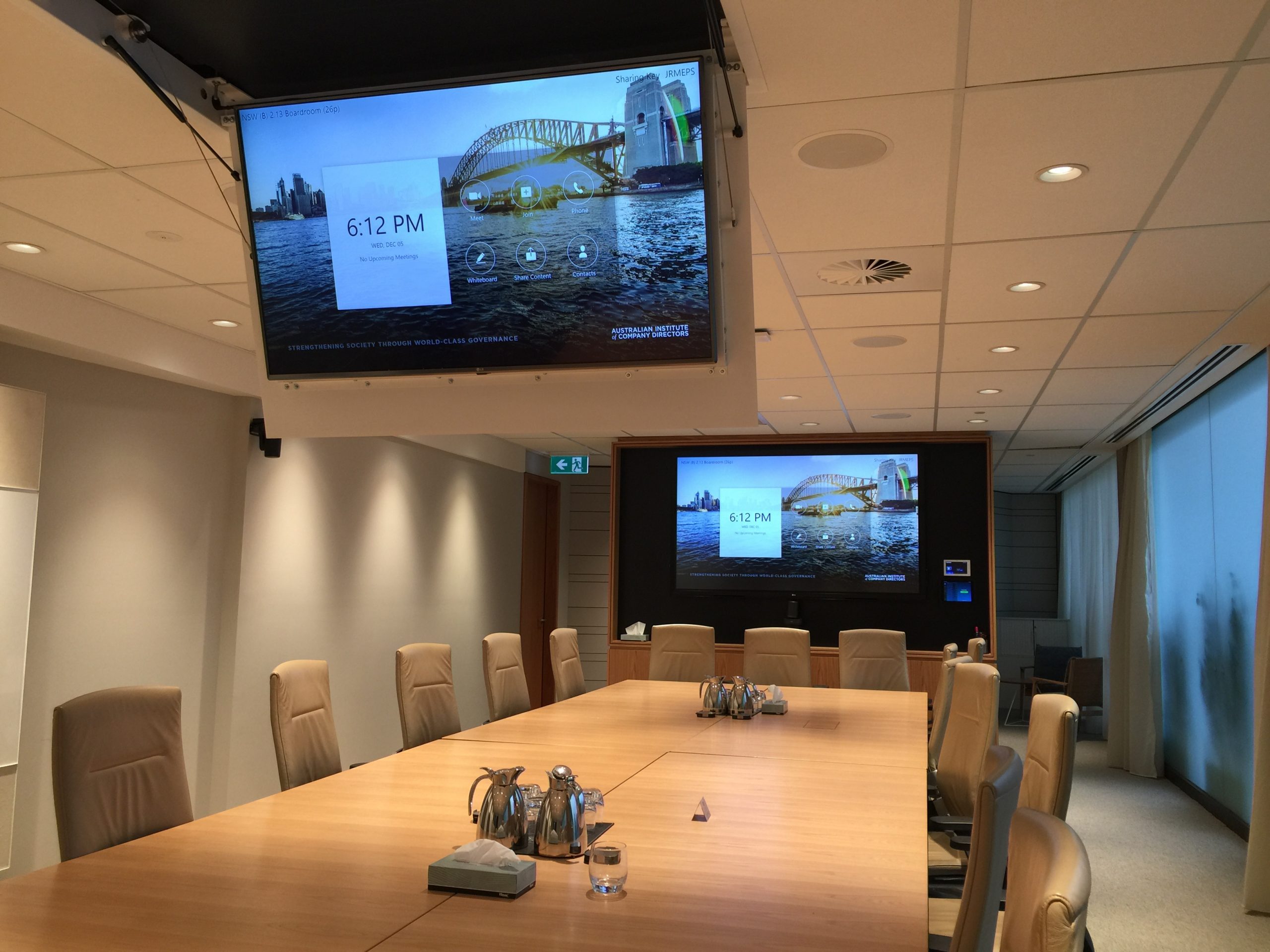
The first step is to assess the room’s size, layout, seating capacity and intended use. A small boardroom may only require one camera and a display, whereas a large conference room may need multiple cameras, ceiling microphones, distributed speakers and additional screens.
Consider how many people typically attend meetings, where participants sit and whether the room is used for presentations, video conferences or hybrid meetings.
It is also important to assess the existing AV infrastructure, including network connections, power outlets, cabling and installed equipment. This helps identify potential limitations before installation begins.
Working with an experienced AV consultancy provider can help businesses determine the right equipment and system configuration for their requirements.
2. Choose the Right Video Conferencing Equipment
Selecting suitable equipment is essential for delivering a reliable video conferencing experience. Each component must work together to provide clear communication and consistent performance.
The main equipment to consider includes:
- Cameras: High-quality PTZ (pan-tilt-zoom) cameras or intelligent tracking cameras help capture participants across larger spaces.
- Microphones: Ceiling microphones, table microphones or microphone arrays ensure voices are captured clearly throughout the room.
- Speakers: Professionally positioned speakers distribute audio evenly so participants can hear remote attendees.
- Displays: Large-format displays or dual-screen configurations allow users to view remote participants while reviewing presentations.
- Video conferencing systems: Dedicated room systems connect cameras, microphones, displays and collaboration platforms.
- Room control systems: Integrated controls simplify the operation of multiple AV devices.
Equipment should be selected based on the room’s requirements rather than simply choosing the most expensive technology. A properly designed solution balances performance, usability and long-term reliability.
3. Position Cameras, Microphones and Speakers Correctly
Even high-quality equipment will not deliver good results if it is positioned incorrectly. Camera placement should provide a clear view of everyone in the room, while microphones must capture voices from different seating positions.
For larger spaces, multiple cameras or intelligent camera systems can help remote participants follow conversations more naturally. Ceiling microphone arrays can also provide coverage without cluttering the meeting table.
Speaker placement is equally important. Audio should be distributed evenly throughout the room without creating echo or feedback. Acoustic treatments may also be necessary in rooms with hard surfaces that reflect sound.
The layout of furniture, lighting and displays should be considered during the design stage to ensure the technology works effectively within the space.
4. Integrate the System with Your Video Conferencing Platform
A large meeting room should provide a straightforward way to start meetings, share presentations and connect with remote participants.
Businesses commonly use platforms such as Microsoft Teams and Zoom. The chosen platform should be compatible with the room’s conferencing hardware, control systems and existing IT infrastructure.
An integrated unified communications solution can connect displays, cameras, microphones, speakers and room controls into one system. This reduces the need for multiple devices and complicated manual configurations.
For example, Noisebox delivered a Microsoft Teams-based collaboration environment for Kraft Heinz in Japan, integrating professional displays, conferencing cameras, room audio and touch controls. The project also required careful coordination of network infrastructure, cabling and equipment mounting to meet local requirements.
This demonstrates why AV integration should consider both the technology and the physical environment in which it operates.
5. Test and Maintain the Video Conferencing System
Before a system is handed over, every component should be tested under realistic meeting conditions.
Testing should include:
- Checking camera coverage and image quality.
- Testing microphone pickup across all seating positions.
- Adjusting speaker levels and checking for echo.
- Verifying screen sharing and presentation functionality.
- Confirming compatibility with conferencing platforms.
- Testing room controls and automated functions.
Staff should also receive guidance on operating the system so they can start meetings without unnecessary technical assistance.
Regular professional AV maintenance is equally important. Software updates, equipment inspections, connectivity checks and troubleshooting help maintain system performance and minimise unexpected disruptions.
Noisebox provides professional service and hardware maintenance to help businesses keep their audiovisual systems operating reliably.
6. Work with an Experienced AV Integration Specialist
Setting up video conferencing in a large meeting room requires careful planning, equipment selection and technical integration. Working with an experienced AV specialist helps ensure that every component works together as intended.
Noisebox Integrated Technologies provides video conferencing, audiovisual consultancy, system integration, unified communications, procurement and ongoing maintenance services.
A good example is the Teachers Health Boardroom project, where Noisebox implemented a Crestron Automate VX intelligent multi-camera solution. The system uses microphone input to direct camera views towards active speakers, helping remote attendees follow discussions more naturally. The project also incorporated voice lift and flexible configurations for the adjoining meeting space.
From initial consultation and system design to installation, commissioning and ongoing support, Noisebox helps organisations create meeting environments that support effective communication and collaboration.
Whether you are upgrading an existing boardroom or designing a new corporate meeting space, choosing the right AV solution can make a significant difference to your team’s experience.
Planning a large meeting room upgrade? Contact Noisebox Integrated Technologies on 02 9638 3300 to discuss your video conferencing and audiovisual requirements.
Frequently Asked Questions
1. How much does it cost to install video conferencing in a large meeting room?
The cost depends on the room size, seating capacity, equipment requirements and level of integration. A system with multiple cameras, ceiling microphones, professional speakers and automated room controls will generally require a larger investment than a basic setup. An AV consultation can help determine the most suitable solution for your budget.
2. How many cameras are needed for a large conference room?
The number depends on the room layout, seating arrangement and conferencing requirements. A single camera may be sufficient for some rooms, while larger boardrooms may benefit from multiple cameras and intelligent camera switching to capture different speakers and viewing angles.
3. What is the best microphone for a large meeting room?
Ceiling microphone arrays are a popular option for larger meeting spaces because they provide broad coverage without occupying table space. Table microphones and other microphone configurations may also be suitable depending on the room design and seating arrangement.
4. How do you prevent echo and background noise during video conferences?
Use appropriately positioned microphones and speakers, configure audio processing correctly and assess the room’s acoustic properties. Acoustic treatments may also help reduce sound reflections and improve speech clarity.
5. Can an existing meeting room be upgraded for video conferencing?
Yes. Existing meeting rooms can often be upgraded by integrating new cameras, microphones, displays, speakers and conferencing systems. An initial AV assessment helps determine which existing equipment can be retained and what needs replacing.
6. How long does it take to install a video conferencing system?
Installation time depends on the room’s complexity, equipment availability, cabling requirements and integration work. A straightforward installation may take less time than a large boardroom project involving multiple cameras, ceiling microphones and automated controls. A project assessment will help establish a realistic timeframe.