In today’s fast-paced business world, connecting with colleagues, clients, and partners remotely has become more important than ever. Video conferencing is no longer a luxury, it’s a core part of modern communication. From boardroom meetings to virtual team collaborations, it enables organisations to work efficiently, regardless of location.
This guide explains what video conferencing is, how it works, the benefits for businesses, and how the right setup can transform your meetings.
Understanding Video Conferencing
At its simplest, video conferencing is a technology that allows two or more people in different locations to see, hear, and communicate with each other in real time. Unlike traditional phone calls, video conferencing adds a visual element, enabling participants to read body language, share screens, and collaborate more effectively.
It is widely used across business sectors, including corporate offices, education, healthcare, and government, making remote communication seamless and interactive.
How Video Conferencing Works
Video conferencing combines several components to create a real-time audio-visual experience:
1. Video Input
This usually comes from cameras, built into laptops or standalone devices in meeting rooms. High-definition cameras capture clear visuals of participants and the environment, ensuring a professional experience.
2. Audio Input
Microphones capture participants’ voices. In modern setups, boundary microphones or ceiling mics in conference rooms help pick up sound from multiple speakers without distortion.
3. Video and Audio Transmission
Captured audio and video are encoded into digital data and transmitted over the internet or a private network. Platforms like Zoom, Microsoft Teams, or Cisco Webex handle the compression and real-time delivery.
4. Display and Output
Participants view the meeting on screens, monitors, or projectors. For large rooms, multiple displays or a central screen ensure everyone can see the presenter and shared content clearly.
5. Additional Features
Most video conferencing systems also allow:
- Screen sharing for presentations
- Recording for future reference
- Virtual backgrounds and touch-up features
- Integration with calendars and collaboration tools
The combination of hardware, software, and network infrastructure allows meetings to happen smoothly and efficiently, even across continents.
Types of Video Conferencing
Businesses can choose from several types depending on their needs:
1. Desktop Video Conferencing
Ideal for individual participants, this setup uses laptops or desktop computers with built-in cameras and microphones. It’s simple and cost-effective for smaller meetings.
2. Room-Based Video Conferencing
For boardrooms or meeting rooms, professional setups with dedicated cameras, microphones, and displays provide a high-quality experience. Noisebox specialises in custom room-based solutions, ensuring meetings are clear and professional.
3. Telepresence Systems
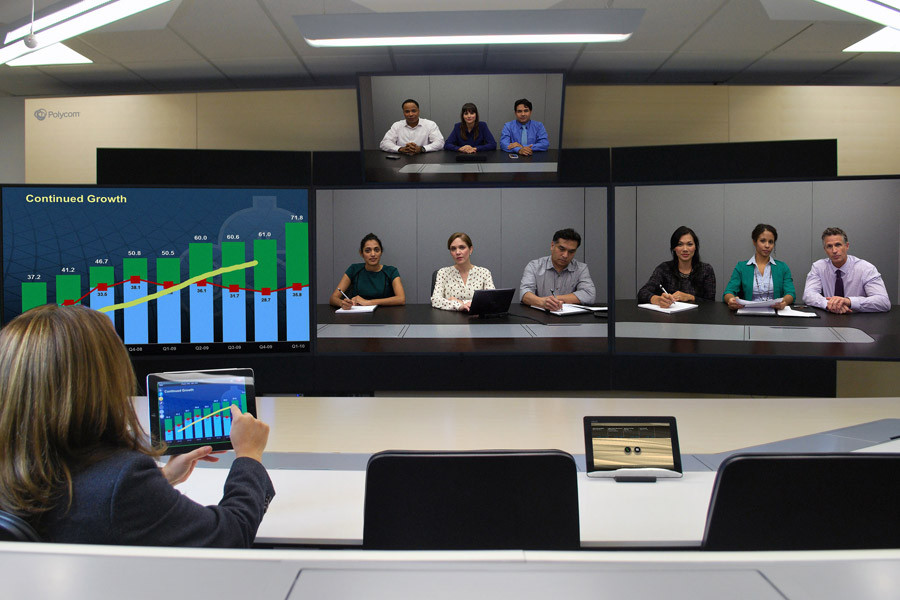
These high-end solutions replicate the experience of being in the same room. With multiple screens, life-sized images, and premium audio, telepresence is often used by executives and multinational teams.
Benefits of Video Conferencing for Businesses
Investing in a professional video conferencing setup offers multiple advantages:
1. Saves Time and Travel Costs
Eliminating the need for frequent travel saves employees both time and money while reducing carbon footprint.
2. Enhances Collaboration
Visual cues and screen-sharing enable effective collaboration, improving understanding and decision-making.
3. Supports Remote Work
As remote work becomes more prevalent, video conferencing ensures teams remain connected and productive.
4. Boosts Productivity
By reducing delays, enabling quick decision-making, and allowing instant problem-solving, video conferencing can significantly increase overall business efficiency.
5. Improves Professional Image
High-quality meetings with clear audio, video, and visual content reflect professionalism and build trust with clients and partners.
Common Video Conferencing Challenges
Despite its benefits, businesses can encounter obstacles if systems aren’t set up correctly:
- Poor Audio Quality: Echoes, background noise, or low microphone quality can disrupt communication.
- Lag and Connectivity Issues: Slow internet or insufficient bandwidth leads to choppy video and delays.
- Inadequate Room Setup: Incorrect camera angles, bad lighting, or low-quality screens can make meetings frustrating.
- Complex User Experience: Staff may struggle with complicated software or integration issues.
Addressing these challenges requires a professional installation and ongoing support to ensure meetings are smooth and productive.
Tips for a Successful Video Conferencing Setup
1. Choose the Right Platform
Select a platform that integrates with your workflow, supports multiple participants, and includes features like screen sharing and recording.
2. Optimise Your Network
A reliable, high-speed internet connection is essential. Wired connections are often more stable than Wi-Fi for conference rooms.
3. Invest in Quality Hardware
Professional cameras, microphones, and speakers make a significant difference in meeting quality. Noisebox can tailor solutions to your specific room size and requirements.
4. Design the Room Correctly
Lighting, acoustics, and seating layout impact the experience. Properly designed rooms prevent shadows, echo, and uneven visuals.
5. Provide Training
Ensure team members know how to operate the system efficiently. User-friendly interfaces and training reduce frustration and wasted time.
Real-World Case Example
A corporate client had frequent video conference issues in their boardroom, poor audio, lagging video, and inconsistent screen sharing disrupted meetings. Noisebox assessed their setup and installed a custom room-based video conferencing solution, including ceiling microphones, high-definition cameras, and large displays.
Result: Meetings became seamless, communication improved, and productivity increased, saving the company both time and frustration.
This highlights how a professionally designed system can transform business operations.
The Future of Video Conferencing
Video conferencing technology continues to evolve:
- Artificial intelligence (AI) improves background noise cancellation, automatic framing, and transcription.
- Cloud-based systems enhance flexibility and scalability.
- Integration with collaboration tools streamlines workflows across multiple platforms.
Businesses that adopt modern video conferencing solutions gain a competitive edge, keeping teams connected and productive regardless of location.
Conclusion
Video conferencing is more than just a tool, it’s a business-critical technology that enables efficient communication, collaboration, and decision-making. Understanding how it works, investing in professional setups, and implementing best practices ensures businesses can maximise its benefits.
For companies seeking reliable, high-quality video conferencing solutions, working with experts like Noisebox ensures meetings run smoothly, professionally, and without interruptions.
Need a Professional Video Conferencing Solution?
At Noisebox, we design and install tailored video conferencing systems for businesses of all sizes. From boardrooms to training rooms, we ensure high-quality audio, video, and seamless integration with your existing workflows.
Transform your meetings today and experience the full potential of video conferencing with a professional solution.
Frequently Asked Questions
What is video conferencing?
Video conferencing is a technology that allows two or more people in different locations to see, hear, and communicate with each other in real time, using cameras, microphones, and internet or network connections.
How does video conferencing work?
Video conferencing works by capturing audio and video through microphones and cameras, encoding the data digitally, and transmitting it over the internet or private networks. Participants view the video on screens and can interact using features like screen sharing and chat.
What are the benefits of video conferencing?
Video conferencing saves travel time and costs, supports remote work, improves collaboration, enhances productivity, and allows businesses to present a professional image to clients and partners.
What equipment is needed for video conferencing?
Essential equipment includes cameras, microphones, speakers, and displays. For professional setups, additional items like ceiling microphones, large displays, and room acoustics optimisation may be required.
What are common video conferencing challenges?
Common challenges include poor audio quality, lagging video due to insufficient bandwidth, inadequate lighting, improper room setup, and complex software interfaces.
Can video conferencing integrate with other business tools?
Yes. Modern video conferencing platforms often integrate with calendars, collaboration tools, and file-sharing software to streamline workflows and scheduling.